
Coming soon: $49.
Version 1.0.0, released 17 October 2026. What changed
Style variations, live: Concrete (city), Larch (mountain), Whitewash (coast)
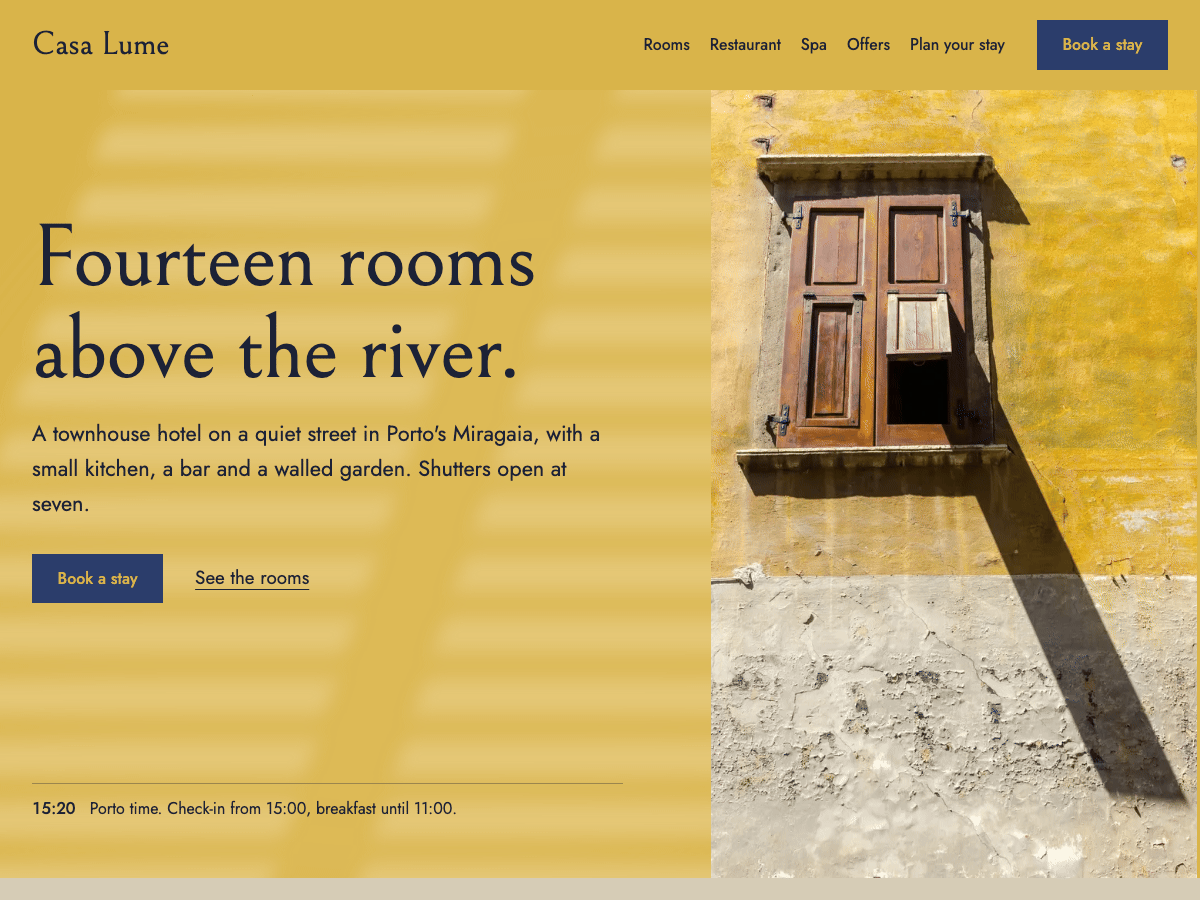
A block theme for owner-run boutique hotels. The site is the house's own limewashed wall: photographs are windows set into it, every room states its size, bed, view and price in the same ruled fields, and one Book a stay button follows the guest down every page. The site keeps the hotel's clock, and after 19:00 in the hotel's town it turns down: the wall goes to night, the type to lamplight, and the light through the shutters becomes a lamp left on. It is all core blocks, so the owner keeps rooms, offers and practical facts current in the Site Editor, with no page builder and no demo import.
Features
- A front page that looks like a design hotel's site on a fresh install: the house beside its photograph, the rooms, the kitchen and bath house, the practical facts, and a closing band in night ink
- The turndown: the hotel's own clock decides day or night, the first evening view dims once, and an owner can switch it off in one place
- Light through the shutters falls across the hero wall and lengthens as the page scrolls, still for visitors who prefer reduced motion
- One Book a stay button kept in one place for every page, ready for any booking engine's link
- Room facts in fixed fields (size, bed, view, price from), a key tag beside each room's number, and a page pattern for each room
- Every page opens with its own photograph set into the wall like a window: 20 bundled photographs of one house and its street
- Page patterns for the rooms, a single room, the restaurant with its menu and bar, the bath house with its treatments, offers, plan your stay, about and contact
- A sticky header that keeps Book a stay in reach, which the owner can turn off
- Three style variations for city, coast and mountain (Concrete, Whitewash, Larch), two more colour palettes and two type pairings; the night palette follows every one of them
- A journal for the hotel's news, the restaurant's hours with today's row lit, the desk's contact details, offers, a guest book and the questions guests ask
- Bundled fonts (Bellefair, Jost, Castoro) and photographs, with no external requests
- Accessible: a skip link, one main heading per page, text that reflows at 200%, visible keyboard focus, and contrast checked against WCAG AA by day and by night in every style variation
- Translation-ready, for WordPress 6.9 and later
Works with
- Complianz: the cookie banner in the theme's colours and type, in every style variation
Setup guide
Turndown is a WordPress block theme for owner-run boutique hotels. The front page is the house's limewashed wall: a sentence about the house, Book a stay, the hotel's clock, and a photograph set into the wall like a window. Below it come the rooms with their facts, the kitchen and bath house, the practical facts, and a closing band in night ink. Everything is made of core blocks, so you change it in the Site Editor like any other text, with no page builder and no demo import.
Requires WordPress 6.9 or later and PHP 7.4 or later.
Install
- In Appearance > Themes > Add New Theme, choose Upload Theme, select the Turndown zip, then Install and Activate.
- Open Appearance > Editor (the Site Editor). The front page already looks like a finished site. Replace the demo hotel's details with your own, using the checklist below.
First steps: your hotel's details
Turndown keeps the details you change most in one place each.
- Book a stay. Every Book a stay button on the site is one template part: Appearance > Editor > Patterns > Template parts > Book a stay. It ships pointing at an email address (
[email protected]), because a theme can't know your booking engine. Select the button, then paste your booking page's address (Mews, Cloudbeds, SiteMinder, Booking.com or your own) as its link. Change it once and every page follows. - The hotel clock. The line under the front page's buttons shows your hotel's local time and the fact that matters at that hour: by day the first line ("Check-in from 15:00, breakfast until 11:00"), after 19:00 the second ("The rooms are turned down; the bar is open until midnight"). Edit both lines in Template parts > Hotel clock. The time comes from your site's time zone, so set your hotel's city in Settings > General > Timezone (a city, not a UTC offset).
- Opening hours. The kitchen and bar's week is the Opening hours template part. Edit the table once and it changes everywhere. Keep one row per day and start each row with the day's name; today's row lights up for visitors in your hotel's time zone.
- Name, tagline and logo. Change these under Settings > General or by clicking the name in the header. To add a logo, use Styles > Site identity.
- Address, phone and email. The footer holds the address, the desk's phone and email, and your social links. The The desk pattern on the Contact and Plan your stay pages keeps its own copy. For a phone or email link, change both the text and the link: select it, then edit the link in the toolbar.
- Social links. The footer's Instagram and Facebook icons point at the sites' front pages. Select each icon and paste your profile's address, add another with the block's +, or remove the ones you don't use.
The turndown
After 19:00 in your hotel's time zone (until 07:00), the site turns down: the wall goes to night, the type to lamplight, Book a stay to lamp gold, and the hero photograph dims. A visitor's first evening page dims once, slowly; the next pages load already turned down. Visitors who prefer reduced motion see it switch at once.
The night colours are mixed from your palette, so they follow every style variation and every colour you choose.
To switch it off, open Template parts > Hotel clock, select the group around the two lines, and in Styles choose Hotel clock instead of Hotel clock and turndown. The clock still shows the time and the right line; the site keeps its day colours.
To see either state at any hour, add ?turndown=day or ?turndown=night to any address on your site.
Rooms
The front page shows three rooms. Each row is a photograph, a short description, and a Room facts table: size, bed, view and the price from, always in that order, so guests compare like with like. Edit the table's cells like any text; add a row for a second price with the table's toolbar.
Each room links to its own page at /rooms/<room>/. To make one, create a page with Rooms as its parent and choose the Room page pattern (one of three, each laid out for a different room), then replace the photograph, the name, the description and the facts.
Pages
When you create a page, WordPress offers Turndown's page patterns:
- Rooms page: every room with its key tag, its facts and a link to its page, then what every room has.
- Room page: one room with its key tag, facts and Book a stay, what only that room has, and the other rooms.
- Restaurant page: dinner in the cellar, the menu, the bar upstairs and the kitchen's hours.
- Bath house page: the treatments with their times and prices, and what the bath house uses.
- Offers page: the season's offers in ruled rows, and the guest book.
- Plan your stay page: check-in, check-out, breakfast, payment, getting here, parking, cancellation, access, then the questions guests ask and the desk.
- About page: how the house was restored, the people at the desk, and the house in one line.
- Contact page.
Each page pattern opens with its own page head: the title on the wall beside a photograph set in like a window, so the page's title isn't shown twice. Replace the photograph with one of your own house (select it and choose Replace).
The front page is the Front Page template in the Site Editor, so Settings > Reading doesn't change it. To show your own page there instead, edit the Front Page template, or delete it under Templates so that WordPress follows Settings > Reading.
Menus
The header and footer menus list your pages, with each room page under Rooms. To choose and order the links yourself, select a menu and pick or create one in the Navigation block (Create new menu).
Header
The header stays at the top of the screen as visitors scroll, so Book a stay is always in reach. To let it scroll away instead, select the header's outer group and, under Position in the block settings, choose Default. On very short screens (a phone held sideways) it scrolls away by itself.
To swap the header, select it in the Site Editor and click Replace: On the wall (the default), Title left, menu and button right or Centered. There are three footers: Night ink (the default), Columns and Minimal. To go back to what the theme shipped, open the template part's menu and choose Reset.
Styles
Under Styles in the Site Editor:
- Style variations: Concrete (city, with light Jost headings), Whitewash (coast, in harbour blue) and Larch (mountain, with Castoro headings).
- Colour palettes: Azulejo and Olive grove.
- Type pairings: Castoro and Jost, and Jost throughout.
The shutter light on the hero wall, the night palette and the lamplight are all mixed from the palette, so they follow whatever colours you choose.
Some blocks use Turndown's own styles, which give them their look: Full-height hero (the front page's opening), Page head (the shorter wall and window that opens each page), Window in the wall (photographs cropped to their box), Room facts (the ruled fact tables), Room key tag (the key tag beside a room's number), Shutter slats (a separator drawn as a run of slats), Hotel clock and Hotel clock and turndown, and Opening hours. To lay a block out freely, switch its style to Default in the block settings.
Fonts
Turndown bundles its fonts, so nothing loads from outside your site:
- Bellefair for headings, Jost for text, and Castoro for the Larch variation and the Castoro type pairing.
All three are under the SIL Open Font License. To use other fonts, add them in Styles > Typography > Fonts (the Font Library), then choose them for headings or text.
Journal
The posts page is the hotel's journal. Write news, openings and seasonal notes as ordinary posts; give each a featured image, which leads the post.
Credits
Photographs are CC0 from the WordPress Photo Directory, Rawpixel and StockSnap, listed with their sources in readme.txt. Replace them with your own photographs of the house: select an image and choose Replace.
Page loader
A spinner that covers the page while it loads, off until you add it. Go to Appearance > Editor > Patterns > Template parts > Header, open the inserter's Page loader patterns and add Ring, Dots or Bar (a thin line along the top) anywhere in the header. To switch, delete it and add another one; to turn it off, delete it. It lifts as soon as the page has loaded, and visitors who set their device to reduce motion never see it.
Changelog
1.0.0 · 17 October 2026
- Initial release