
Coming soon: $59.
Version 1.0.0, released 17 October 2026. What changed
Style variations, live: Cellar, Limestone, Verdigris
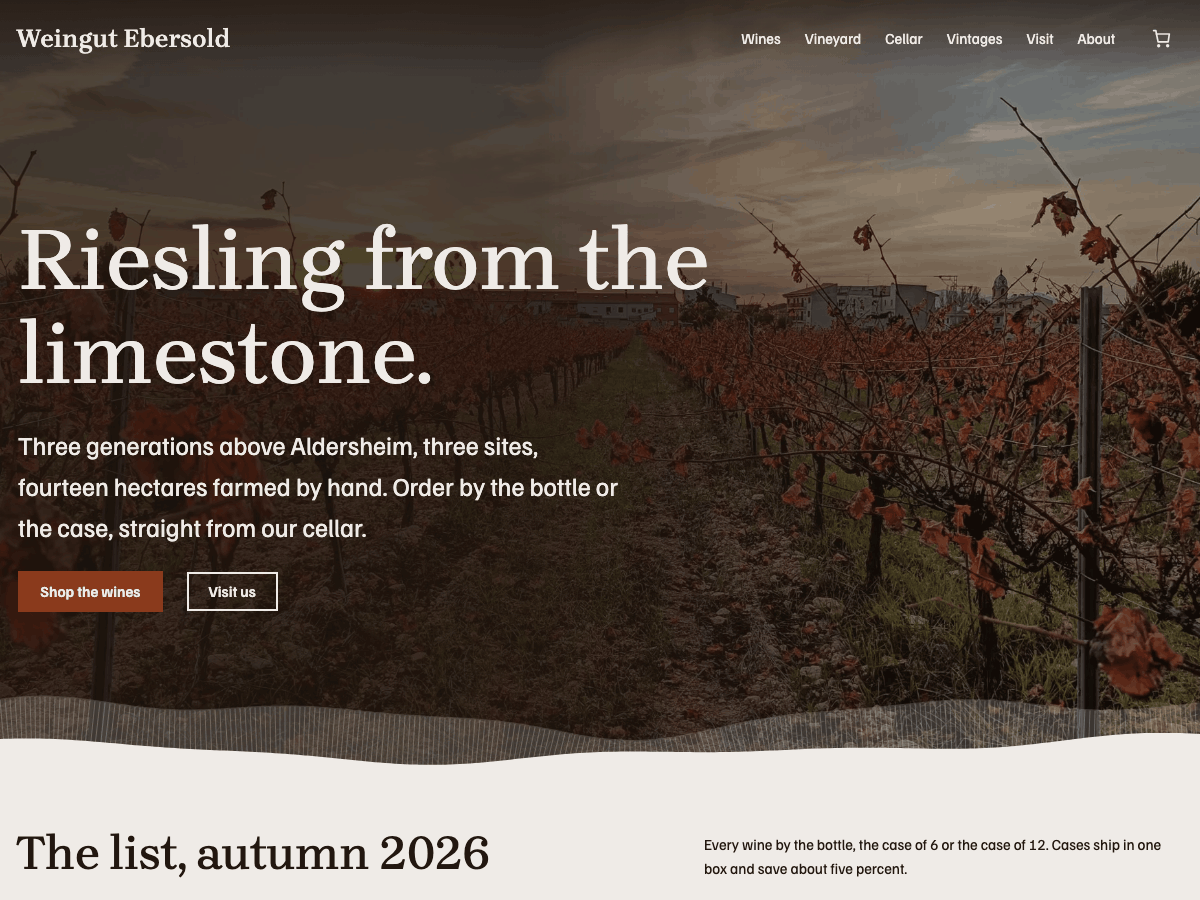
A WooCommerce block theme for family estate wineries that sell their own wine. The site is the estate's printed price list: every wine one numbered row, its packs (a bottle, a case of 6, a case of 12) side by side with the chosen pack's price, ready for the basket. Between the pages of the list, the vineyards run full bleed. A wine's page puts the facts a buyer checks beside the price: vintage, grape, region, site, style, alcohol, bottle size and food pairing. Click a wine on the list and its row opens into the wine's page. It is all core and WooCommerce blocks, so the owner keeps wines, prices, vintages and visiting hours current in the Site Editor, with no page builder and no product-option plugin. A demo pack in the download imports the estate's pages, posts and wines.
Features
- The shop is the list: the shop page, the front page and a list hero show every wine as a numbered row with its packs, the chosen pack's price and Add to cart, in one place
- Cases without plugins: bottle, case of 6 and case of 12 are WooCommerce variations, the bottle preselected, each pack with its own price
- A wine's page with its label, its tasting note, the packs, and the facts on a ruled list (vintage, grape, region, site, style, alcohol, bottle, food pairing) from the product's attributes
- The row opens into the wine: the wine's name moves from the list to its own page (a view transition), and a cellar stamp marks a row once its wine is in the cart; both are still for visitors who prefer reduced motion
- Three heroes: the landscape, the list itself, and the newest wine with its label and facts
- A header over the hero's photograph on the front page, and a sticky header that keeps the basket in reach
- Full-bleed vineyard bands, the estate's sites, a cellar-door visit band, and delivery, returns and payment in plain words
- Three page loaders (a ring, dots, a bar) to switch on in the header, never shown to visitors who prefer reduced motion
- Bundled fonts (Brygada 1918, Familjen Grotesk) and photographs, with no external requests
- Accessible: a skip link, one main heading per page, text that reflows at 200%, visible keyboard focus, and contrast checked against WCAG AA
- Presentation only: age checks, shipping rules and alcohol tax stay with the plugins made for them, and the buyer guide names them
- Translation-ready, for WordPress 6.9 and later
Works with
- WooCommerce: a shop in the theme's style: product pages, cart and checkout
- Complianz: the cookie banner in the theme's colours and type, in every style variation
Setup guide
Cellar Door is a WordPress block theme for family wineries that sell their own wine. The site reads like the estate's printed price list: every wine is one numbered row, with a bottle, a case of 6 and a case of 12 side by side and the price of the one you pick, ready for the basket. Between the pages of the list, your vineyards run full width. The shop runs on WooCommerce. Everything else is made of core blocks, so you change it in the Site Editor like any other text, with no page builder and no product-option plugin.
Requires WordPress 6.9 or later, PHP 7.4 or later and the WooCommerce plugin.
Install
- In Appearance > Themes > Add New Theme, use Upload Theme with the zip, then Activate.
- Install and activate WooCommerce under Plugins > Add New Plugin, and follow its setup steps (your address, currency, payments). WooCommerce creates the Shop, Cart and Checkout pages for you.
- Open Appearance > Editor (the Site Editor). The front page already looks like a finished estate site. Replace the demo estate's details with yours, using the steps below.
Demo content (optional)
The download's demo/cellar-door-demo.xml holds the demo estate: its pages, its news posts and its eight wines with their packs, facts and label pictures. To start from it rather than from an empty shop:
- Activate WooCommerce first, so the wines have somewhere to go.
- Go to Tools > Import > WordPress, install the importer when WordPress asks, and upload the file.
- Assign the posts to your own user, tick Download and import file attachments, and start the import. The label pictures download from the theme's live demo, so the import needs an internet connection.
Then replace the estate's words, wines and pictures with your own. The pages are built from Cellar Door's patterns, so each one opens in the editor as ordinary blocks.
First steps: your estate
- Name, tagline and logo. The name in the header is your site title. Change it under Settings > General or by clicking it in the header. To add a logo, select the empty space before the name in the header and choose Add a site logo.
- The landscape photo. On the front page, select the big photo (the Cover block) and use Replace in the toolbar to upload your own. A wide photo of your vineyards works best, at least 2000 pixels across.
- The line under the heading. Click it and type. Keep it to one or two sentences: where you are and what you grow.
- The two buttons. Shop the wines goes to your shop. Visit us goes to the page at
/visit/; make a page called Visit (see Pages) or change the button's link.
Your wines
Every wine is a WooCommerce product, under Products > Add New Product.
- Name and note. The product name is the wine's name on the list, for example "Riesling trocken 2025". The short description is the line under it on the list and the tasting note on the wine's page. Keep it to two short sentences. The long description goes further down the wine's page.
- Photo. The product image is the bottle or its label. Use the same background and size for every wine, so the list looks like one set.
- Bottle, 6 and 12. Set the product type to Variable product. Under Attributes, add one called Pack with the values
Bottle | Case of 6 | Case of 12, and tick Used for variations. Under Variations, choose Generate variations and give each pack its own price. Under Default form values, pick Bottle, so the bottle is already chosen on the list. A wine sold only by the bottle can stay a Simple product. - The facts. Add the other details as attributes too, one each, with Visible on the product page ticked: Vintage, Grape, Region, Site, Style, Alcohol, Bottle and Food pairing. They appear on a ruled list under The details on the wine's page. Leave out the ones you don't need.
- Categories. Put each wine in a category such as White, Red, Sparkling or Sweet. The Shop: categories pattern shows them as ways into the shop.
- Order on the list. The list follows the order you set under Products > Sorting: drag the wines into place. A new wine goes to the end until you move it.
When a visitor clicks a wine on the list, its row opens into the wine's page. When a wine is in the basket, its row gets a small cellar stamp. Both stay still for visitors who prefer reduced motion.
Selling wine: what plugins do
Cellar Door only changes how your shop looks. Some things a wine shop needs belong in WooCommerce or in a plugin made for them:
- Shipping costs and where you deliver: WooCommerce's own Settings > Shipping.
- VAT and alcohol tax: WooCommerce's own Settings > Tax. Ask your tax adviser which rates apply where you ship.
- Age check: an age verification plugin, such as Age Gate, which asks visitors to confirm their age before they see the shop.
- Legal shop rules in Germany and the EU (price per litre, delivery times, the legal text pages): a plugin such as Germanized for WooCommerce.
Opening hours
The cellar door hours live in one place: Appearance > Editor > Patterns > Template parts > Opening hours. Edit them there, or on any page that shows them, and every page changes. Write "By appointment" or "Closed" on the days you don't open.
Links and details to replace
The demo uses a made-up estate, Weingut Ebersold. Replace its details with yours:
- Email:
[email protected](the contact details, the tastings and the visits) - Address, phone and directions: the Contact details pattern and the Visit page
- Social: the Instagram and Facebook homepages (footer icons). Select each one and set your profile link, or remove the ones you don't use.
- The three sites (Morgenhang, Hohe Mauer, Alter Kirchweg) and their photos: the Three sites section on the front page
Pages
When you create a page, WordPress offers Cellar Door's page patterns:
- Vineyard: your land, your sites and the year in the vineyard.
- Cellar: how you make the wine, with the cellar photos.
- Vintages: one short note per year, newest first.
- Visit: tastings, vineyard walks, the opening hours and how to get there. Name this page Visit, so the Visit us buttons find it.
- About: the family and the people who help at harvest.
- Contact: address, phone, email and the hours.
- Landing: a long page for a new release or an open cellar weekend.
Your shop page (WooCommerce's Shop, called Wines in the demo) shows the whole list. Rename it in Pages if you like.
Page templates, chosen under Template in the page settings: the default page, Page without title, Wide page (landing) and Blank. The heroes are made for the front page; on another page, use Page without title so the page has one main heading.
The front page is the Front Page template in the Site Editor, so Settings > Reading does not change it. To show your own page there instead, edit the Front Page template, or delete it under Templates so that WordPress follows Settings > Reading.
Heroes
Three heroes come with the theme, under Patterns when you insert a block:
- Hero: the landscape: your vineyards full width, the one on the front page.
- Hero: the list: the list itself first, with the first four wines ready to buy.
- Hero: the new release: your newest wine, large, with its label, its facts and its packs.
News
News items are ordinary posts: harvest reports, new releases, the open cellar weekend. Give each one a featured image. A new WordPress site comes with a "Hello world!" post; delete it.
Menus
The header and footer menus list your pages until you make a menu. Select the menu in the header and use Create new menu. On the front page the header sits on the landscape photo; on every other page it sits above the content. For a header that stays at the top while visitors scroll, with the basket always in reach, insert the Header: sticky, with the basket pattern into the header.
Page loaders
Three patterns, Page loader: Ring, Page loader: Dots and Page loader: Bar, cover the page in your brand colour until it has loaded. Insert one into the header to show it on every page; delete it to turn it off. Visitors who prefer reduced motion never see one.
Styles
Under Appearance > Editor > Styles:
- Style variations: Cellar, Limestone and Verdigris.
- Colour palettes: Moss and Straw.
- Typography: Brygada 1918 throughout, and Familjen Grotesk throughout.
Rust is for prices, the list's numbers and every buy button; the rest of the site is clay paper and iron ink. The colours are named in Styles > Colors.
Block styles: Estate list (on a product collection, for the numbered rows), Over the hero (on the front page's header), Opening hours (on the hours table) and four section styles (Tint, Brand, Inverted and Highlight).
Fonts
Cellar Door bundles its fonts, so nothing loads from outside your site:
- Brygada 1918 (headings and wine names), SIL Open Font License 1.1.
- Familjen Grotesk (text, menus, prices and buttons), SIL Open Font License 1.1.
To change them, use Styles > Typography, or install other fonts with the Font Library.
Accessibility
Contrast meets WCAG AA in every style variation, keyboard focus is always visible, text reflows at 200% on phones, and each page has one main heading. The moving parts (the row opening into the wine, the cellar stamp) stay still for visitors who prefer reduced motion.
Credits
Cellar Door by Gridwerk Themes, licensed GPLv2 or later. Every bundled font and photograph is listed with its licence and source in readme.txt.
Page loader
A spinner that covers the page while it loads, off until you add it. Go to Appearance > Editor > Patterns > Template parts > Header, open the inserter's Page loader patterns and add Ring, Dots or Bar (a thin line along the top) anywhere in the header. To switch, delete it and add another one; to turn it off, delete it. It lifts as soon as the page has loaded, and visitors who set their device to reduce motion never see it.
Changelog
1.0.0 · 17 October 2026
- Initial release