
Version 1.0.3, released 17 October 2026. What changed
Style variations, live: Amplifier, Daylight, Static
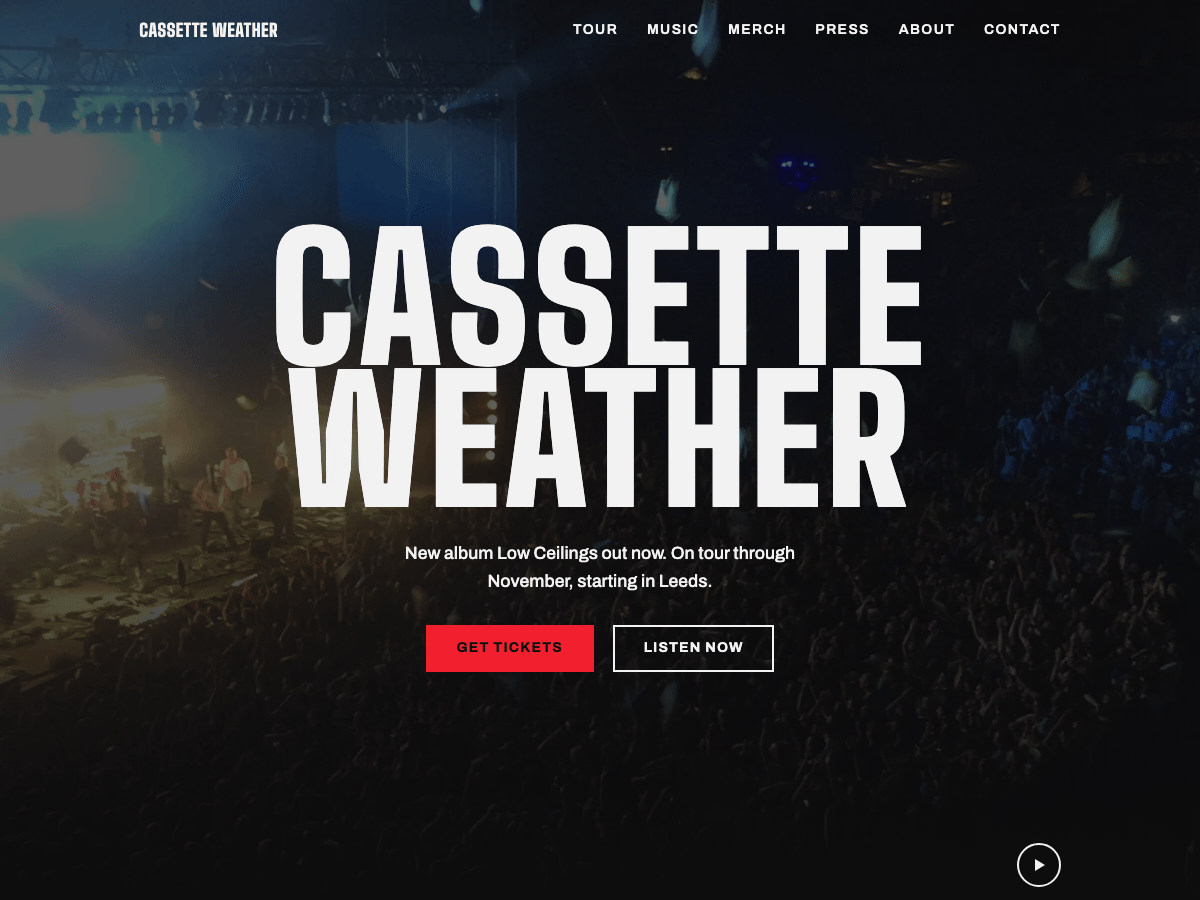
A block theme for rock bands. The front page opens on the band's own video, full width and full height, with the band name over it and one red button to the tickets. The tour dates sit straight underneath, then the new record, the merch and the news. It is all core blocks, so the band keeps the dates current in the Site Editor, with no page builder, no plugin and no demo import.
Features
- A full-screen video hero: muted and looping, with a pause button, a poster until it plays, and stillness for visitors who prefer reduced motion or are saving data
- Tour dates kept in one place: edit them once and the front page and the Tour page both change; each row has the date, the venue and a ticket button
- One click marks a show sold out: the row stays listed, dimmed, with "Sold out" in place of the ticket button
- The latest record with its artwork, tracklist, a buy button and streaming icons (Spotify, Apple Music, YouTube, SoundCloud)
- Merch, a discography of records to buy or stream, live photos, the line-up, a press kit with downloads, press quotes, show info and contacts as ready-made sections
- Page patterns for the tour, music, merch, press, about and contact pages
- A footer with the band's social icons (Instagram, TikTok, YouTube, Bandcamp, Spotify) in the text colour
- Three heroes (video, photo and release day), two alternative headers and two alternative footers
- Three style variations, two more colour palettes and two type pairings; the stage stays dark in every one
- Bundled fonts (Big Shoulders, Archivo), photographs and a demo video, with no external requests
- Contrast checked against WCAG AA in every style variation, visible keyboard focus, and text that reflows at 200% on phones
- Translation-ready, for WordPress 6.9 and later
Works with
- Complianz: the cookie banner in the theme's colours and type, in every style variation
Setup guide
Backline is a WordPress block theme for rock bands. The front page opens on your band's video, full width and full height, with your name over it and one red button to the tickets. The tour dates sit straight underneath, then your latest record, the merch, the news and the mailing list. Everything is made of core blocks, so you change it in the Site Editor like any other text, with no page builder, no plugin and no demo import.
Requires WordPress 6.9 or later and PHP 7.4 or later.
Install
- In Appearance > Themes > Add New Theme, search for Backline, then Install and Activate. If you have the zip, use Upload Theme.
- Open Appearance > Editor (the Site Editor). The front page already looks like a finished band site. Replace the demo band's details with yours, using the steps below.
First steps: your band
- Name, tagline and logo. The big name over the video is your site title. Change it under Settings > General or by clicking it in the header. To add a logo, select the empty space before the name in the header and choose Add a site logo.
- The video. On the front page, select the video (the Cover block) and use Replace in the toolbar to upload your own clip. Keep it short (10 to 20 seconds), muted and under about 2 MB; it loops. The demo video shows a still poster until it plays. Your own upload shows its first frame instead, and stays still for visitors who prefer reduced motion or are saving data. Every video gets a pause button.
- The line under your name. Click it and type. Keep it to one sentence: the new record, the tour.
- No video yet? Insert the Hero: full-screen photo pattern instead and replace its photo.
Tour dates
The dates live in one place: Appearance > Editor > Patterns > Template parts > Tour dates. Edit them there, or on any page that shows them, and every page changes: the front page and the Tour page show the same list.
- Add a show: select a row (use the List View if a row is hard to grab), then Duplicate from its toolbar menu, and change the date, the day and year, the city and the venue.
- Ticket links: select the Tickets button and change its link to your ticket page. The demo buttons point to
example.com/tickets. - Sold out: select the row's Group and pick the Sold out style in the block settings. The row stays listed, dimmed, and "Sold out" replaces the ticket button. Pick Default to bring the button back.
- Past shows: delete the row. The year under each date helps you spot old ones.
Music, merch and streaming
- Latest release shows the artwork, the title, a line about it, the tracklist, a Buy on Bandcamp button and a row of streaming icons. Replace the artwork, change the button's link to your own store page, and select each icon to set your profile link. Apple Music has no icon of its own in WordPress, so it uses the link icon with "Apple Music" as its name. Add or remove icons with the + in the icon row.
- Merch shows three items with a photo, a price and a buy button. Point every button at your store.
- Records (discography) lists your releases newest first, one row each: the artwork, the format and year, and buttons to buy or stream it. Duplicate a row for a new release.
- Line-up lists the band as rows: name, instrument and a line about each. On the road shows three numbers in the display face.
- Press kit has your short biography and download buttons for press photos, the tech rider and a logo pack. Upload the files to the Media Library and link each button to its file.
Social links
The footer has icons for Instagram, TikTok, YouTube, Bandcamp and Spotify. Select each one and set your profile link, or remove the ones you don't use. The icons take the text colour.
Links to replace
The demo points every button somewhere real but generic. Replace each one with yours:
- Tickets:
https://example.com/tickets(every Tickets button in the tour dates) - Mailing list:
https://example.com/newsletter(Join the mailing list) - Store: the Bandcamp homepage (Buy on Bandcamp, the merch buttons, Everything in the store and the record formats)
- Streaming: the Spotify, Apple Music, YouTube and SoundCloud homepages (Stream it icons)
- Social: the Instagram, TikTok, YouTube, Bandcamp and Spotify homepages (footer icons)
- Email:
[email protected]and[email protected](the contacts section and Email the press office)
Pages
When you create a page, WordPress offers Backline's page patterns:
- Tour: every date, show info (doors, age limits, merch, tickets) and the mailing list.
- Music: the latest record, then every record as a row to buy or stream.
- Merch: shirts, records and tapes, with buy buttons.
- Press: the press kit with its downloads, live photos, press quotes and contacts.
- About the band: your story, the line-up and the numbers from the road.
- Contact: booking, press and management contacts, plus show info.
- Landing: a long page for a release or a tour.
Page templates, chosen under Template in the page settings: the default page, Page without title, Wide page (landing) and Blank. The heroes are made for the front page; on another page, use Page without title so the page has one main heading.
The front page is the Front Page template in the Site Editor, so Settings > Reading does not change it. To show your own page there instead, edit the Front Page template, or delete it under Templates so that WordPress follows Settings > Reading.
News
News items are ordinary posts. The front page shows the latest three under From the road, with their featured images. A new WordPress site comes with a "Hello world!" post; delete it.
Menus
The header and footer menus list your pages until you make a menu. Select the menu in the header and use Create new menu. On the front page the header sits on the video; on every other page it sits above the content.
Styles
Under Appearance > Editor > Styles:
- Style variations: Daylight (a light site under a dark stage), Amplifier (amber, with Archivo headings) and Static (cold blue, mixed-case headings).
- Colour palettes: Blood and Bone.
- Typography: Archivo headings, and Mixed case.
Ticket Red is for buying tickets and the one main action on a page; the rest of the site is black, white and grey. The hero stays dark in every variation, so the video always reads as a stage. The colours are named in Styles > Colors: Stage and On stage set the hero's overlay and text.
Block styles: Sold out (on a tour row's Group), Tour date (on a date), Label (small capitals for short notes) and four section styles (Tint, Brand, Inverted and Highlight).
Fonts
Backline bundles its fonts, so nothing loads from outside your site:
- Big Shoulders (headings, the band name and the dates), SIL Open Font License 1.1.
- Archivo (text, menus and buttons), with italics, SIL Open Font License 1.1.
To change them, use Styles > Typography, or install other fonts with the Font Library.
Accessibility
Contrast meets WCAG AA in every style variation, keyboard focus is always visible, text reflows at 200% on phones, and the background video has a pause button and stays still for visitors who prefer reduced motion. Each page has one main heading, and each tour date heads its own row.
Credits
Backline by Gridwerk Themes, licensed GPLv2 or later. Every bundled font, photograph and video is listed with its licence and source in readme.txt.
Changelog
1.0.3 · 17 October 2026
- Every ready-made page opens on its own full-width photo with the page title: Tour, Music, Merch, Press, About and Contact.
- Merch lists shipping, sizes and returns; Press offers its downloads side by side with the press email; Contact says what to send to book a show.
- Show info sits beside its heading, its questions on hairlines like the tour dates. Buttons answer a press.
- On phones the centered header’s menu button is the three-line icon, like the other headers’, instead of the word Menu.
1.0.2 · 17 October 2026
- The translation template carries the theme’s release date. Nothing else changes.
1.0.1 · 17 October 2026
- A calmer scale throughout; on phones, leads, titles and the band name keep their size.
- The Music page lists every record as a row to buy or stream. About shows the line-up as rows and the numbers from the road. Press offers the press photos, tech rider and logo pack as downloads.
- No page repeats its title, page intros line up with the sections below them, and a page that ends in a full-width band runs into the footer.
- Tour rows place their Tickets button the same way on every row, and the demo weekdays fall on their dates.
- The menu marks the page you are on, and the phone menu button says Menu.
- Prices keep their width in every style variation, and the white-vinyl photo shows a white record.
- Email addresses are links. Every visible string is translatable, and the layout works in right-to-left languages.
1.0.0
- Initial release